How to Use This Tool
- Enter every participating drive capacity in the same unit. Include only array members, not a separate spare.
- Choose a RAID type. This model requires at least two drives for 0 or 1, three for 5, four for 6, and an even count of at least four for 10.
- Read nominal data capacity, redundancy allocation and unused size mismatch. Compare the model with the actual controller or NAS layout and its requirements.
Calculation Method
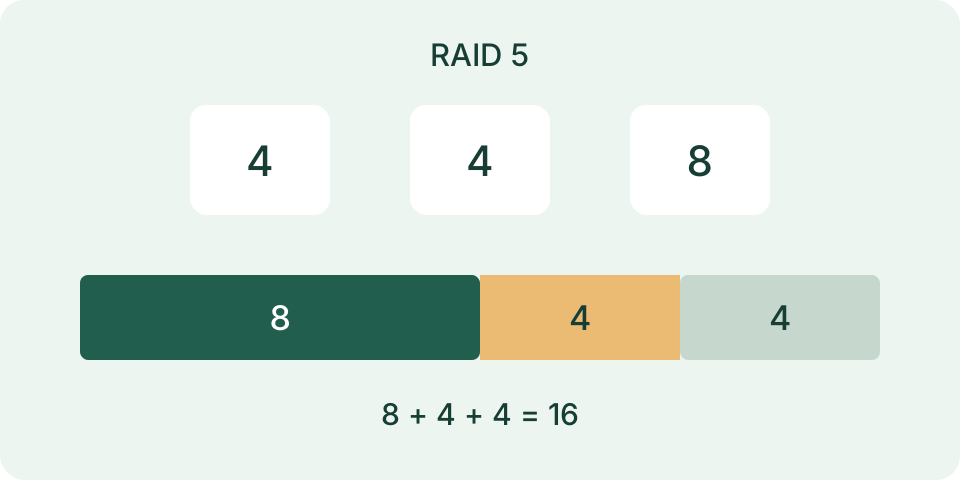
With N drives and smallest capacity S, the model gives RAID 0 N×S, RAID 1 S, RAID 5 (N−1)×S, RAID 6 (N−2)×S and RAID 10 (N/2)×S. RAID 1 treats the entered members as one mirror set. Size mismatch is raw total minus N×S; parity or mirror allocation is separate, not automatically wasted space.
Worked Example
For 2, 4, 4 and 4 TB drives in this RAID 5 model, the raw total is 14 TB and the equal-sized member base is 8 TB. Nominal data capacity is 6 TB, parity allocation 2 TB and unused size mismatch 6 TB.
Enter Only the Drives in the Planned Array
Put one positive capacity per line, all in the same unit. Select GB or TB to label that list and its results. Changing the selector does not convert the numbers: four entries of 4 describe four 4 TB drives with TB selected, but four 4 GB drives after selecting GB without editing them. Decimal fractions are supported; keep the original capacity notation with the result. The calculator does not inspect installed drives or detect their actual capacities.
Include participating drives only. There is no hot-spare field, so adding a spare to the list counts it as a member and changes the result. RAID 0 and 1 need at least two entries, RAID 5 at least three and RAID 6 at least four. RAID 10 needs an even number with at least four. Up to 100 drives are accepted. Invalid or nonpositive values and excessive numerical totals prevent a valid layout; they do not produce a partial capacity estimate.
Understand the Common-Smallest Model
Let N be the drive count and S the smallest entered capacity. The model allocates S on every participating drive. Raw total is the sum of all entries, allocated capacity is N × S, and unused mixed-drive space is raw total minus that allocation. Usable capacity and redundancy are then calculated within the allocation. Unused space is distinct from redundancy; labeling all missing space as parity would misdescribe both quantities.
This is a deliberately simple uniform model, not a controller-specific layout planner. Some implementations can use mixed capacities differently, including particular RAID 0 layouts and vendor storage systems. The page does not calculate SHR, ZFS vdev combinations, JBOD, concatenation or pair-specific mixed-drive optimization. Check the documentation for the intended implementation before treating a numerical result as its supported configuration. A matching disk count alone does not establish compatibility.
Compare Five Levels Using One Input List
For drives of 4, 4, 6 and 6 TB, raw capacity is 20 TB. The smallest is 4 TB, so the uniform allocation is 16 TB and unused mixed-drive space is 4 TB at every listed level. RAID 0 uses all 16 TB of the allocation and assigns no redundancy in this model. RAID 1 reports one full mirrored copy, 4 TB usable and 12 TB redundancy. Its multi-drive full-mirror arithmetic does not mean every product offers that arrangement.
RAID 5 gives 12 TB usable and 4 TB redundancy. RAID 6 gives 8 TB usable and 8 TB redundancy. RAID 10 also gives 8 TB usable and 8 TB redundancy here, but its organization differs from RAID 6. RAID 10 fault tolerance depends on which mirror members fail; it is not a promise that any two drives can fail. The interface does not assign pairs or analyze a specific failure pattern. These totals describe capacity, not a tested recovery outcome.
| Level | Usable | Redundancy |
|---|---|---|
| 0 | 16 | 0 |
| 1 | 4 | 12 |
| 5 | 12 | 4 |
| 6 | 8 | 8 |
| 10 | 8 | 8 |
Keep Formatting and Binary Display Separate
The output uses the unit label you selected and does not subtract filesystem metadata, snapshots, reserved blocks or application overhead. A nominal 12 decimal TB is about 10.913936 TiB before any such deduction. That is a unit conversion, not several terabytes physically disappearing. Use the drive-capacity converter for this separate comparison and keep decimal versus binary labels attached to every number in a report.
A chosen planning reserve is another deduction, not part of the RAID formula. Subtracting a 1.5 TB reserve from 12 TB leaves 10.5 TB for that particular plan; the tool does not have a reserve control or certify it as the actual formatted size. Record each adjustment separately. Existing data, filesystem choices and snapshot retention can affect the room available for new files without changing the raw RAID arithmetic.
Plan Recovery Outside the Capacity Result
Redundancy is not an independent backup. Deletion, corruption and problems affecting the whole system can still require a separate recoverable copy. Keep the backup location, restore process and last verified restore separate from a capacity calculation. This page does not estimate rebuild duration, drive reliability, throughput or endurance, and does not read health reports. No layout is declared safe because its usable number is large or its redundancy number is nonzero.
Reset clears the list and restores RAID 5 with TB as the label. Preserve the input capacities, level and unit before resetting when documenting alternatives. Compare one changed assumption at a time, then confirm supported layouts in the intended system. The RAID capacity and backup guide explains allocation, reserves and an independent restore plan in more detail; it does not replace testing the actual backup or reviewing a controller's configuration.
What the Result Means
Filesystem metadata, controller reserves, formatting, spares and volume limits are excluded. Actual RAID 0 implementations can use more of mixed drives; hybrid systems such as SHR and other layouts can also differ. A controller may impose different counts, including two-drive-only RAID 1. Capacity does not predict speed, rebuild success or failure probability. RAID 10 survival depends on which mirror members fail. RAID is not a backup.
Common Questions
Will Four Mixed Drives Always Produce This Result?
No. The smallest-drive rule is this stated model. Controller layout, hybrid pooling and configured volumes need their own documentation.
Can This Show How Many Failures Are Safe?
It does not guarantee data survival. Failure pattern, array state, rebuild conditions and independent backups matter.