How to Use This Tool
- Enter a short heading and choose a height from 64 to 300 pixels.
- Choose colours, alignment and a background. Check the preview at its actual width.
- Download the PNG, then add the image and its link in Twitch’s panel editor.
Calculation Method
The browser draws the text and background on a canvas exactly 320 pixels wide. Text shrinks to fit one line. Export checks the PNG size against a conservative 1,000,000-byte limit. The solid-colour contrast ratio uses relative luminance; patterned backgrounds need visual inspection.
Worked Example
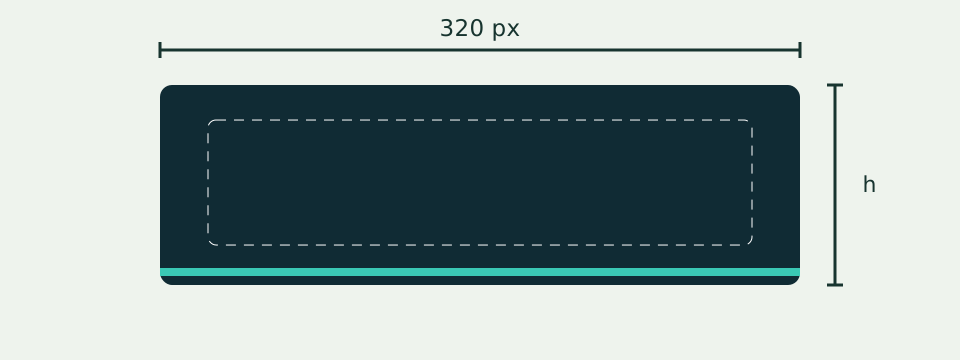
A 320 × 100 panel with the heading SCHEDULE exports at those pixel dimensions. Changing the height does not change its width.
Choose a Label and a Consistent Canvas
Start with the panel's purpose, such as schedule, introduction or community rules. Put the short heading in the title field and keep the detailed explanation in the channel's text description. This maker draws one line; it does not create a multiline information card, edit links or publish to a Twitch account. Choose the same height for related panels when consistent spacing matters, then review each label separately.
The canvas is 320 pixels wide. Height accepts a whole number from 64 to 300 pixels, with 100 as the starting value. These are the maker's bounds, not a live check of Twitch upload requirements. A 320 × 100 canvas contains 32,000 pixels; 320 × 200 contains 64,000. Doubling pixel area does not guarantee twice the PNG bytes or make a long heading fit horizontally. Check the exported file and the current destination rules independently.
Fit Text Within the Actual Title Area
The title is normalized and trimmed, with a limit of 48 Unicode code points. Newlines and control characters are rejected. The tool measures bold text in Arial or its available fallback, reducing the size from 34 to 10 pixels to fit 272 pixels of width. A title still too wide stops ready export. Character count alone does not establish visual fit: different words, scripts and installed fonts can occupy different widths.
The title area leaves 24 pixels on either side. Left, center and right alignment place the reference at 24, 160 and 296 pixels respectively. The accent occupies the bottom four pixels. At height 100, the title is centered in the remaining 96-pixel area, at a vertical reference of 48. Shorten crowded wording rather than filling the title with a description. Review accents and similar letters at the intended display size, especially after changing language.
Distinguish Flat Colors from Illustrated Backgrounds
Choose background, text and accent colors, then solid, bands or artwork. Solid uses the selected flat background. Bands adds the accent shapes; artwork uses the supplied original abstract image with a dark overlay and cover-style cropping. There is no personal photo upload, transparent export, custom font picker or stock-image search. Changing height can change how the supplied artwork is cropped, so review the actual new preview.
The contrast number appears for solid mode and compares text with the chosen background. Black against white gives 21:1; identical colors give 1:1. It does not certify accessibility of a channel or measure every part of an illustrated background. Bands and artwork contain varying colors beneath the letters. Inspect their legibility rather than applying the solid ratio to those themes. The artwork caption identifies an AI illustration, not a real Twitch screenshot or evidence of upload.
Download the Latest Ready PNG
Download creates a PNG from the ready canvas. An image-loading or canvas error is reported rather than silently substituted with a successful blank design. A file of 1,000,000 bytes or more is rejected by this exporter. The byte count is shown after a successful export; it is not a forecast based only on height. Editing a control invalidates pending work so an older asynchronous download cannot be presented as the latest design.
Open the saved PNG and confirm its dimensions and text. The generic filename can overwrite a previous panel in a chosen folder, so rename or organize files by purpose and edition. The maker has no saved project account or batch export. Keep the title, height, colors, alignment and theme separately for later changes. Reset returns the initial localized title, height 100, initial colors, solid theme and center alignment.
Keep Channel Text and Upload Review Separate
A legible image still needs an understandable description and a working destination where appropriate. The canvas alternative label describes this preview; it does not automatically fill another platform's accessibility or description fields. Check the channel editor and actual desktop/mobile presentation separately. The panel design guide explains how to compare a set and preserve useful text. A successful local PNG export alone does not establish current platform acceptance, published layout or audience growth.
What the Result Means
Twitch help articles currently disagree on some upload limits. This editor stays within 320 × 300 pixels and under 1 MB; check the current upload screen. A PNG contains an image, not a working hyperlink. Add the destination link separately in Twitch.
Common Questions
Does Downloading Publish to Twitch?
No. The download stays on your device. Upload and link it through your own Twitch account.
Can I Make a Matching Set?
Keep the colours and height, replace the heading, and export another PNG.