How to Use This Tool
- Enter the operating system and other background baseline in GiB, excluding the applications in the next field.
- Add the combined non-overlapping memory budget for applications running at the same time.
- Enter installed memory and the share of target capacity to leave unallocated in this plan.
Calculation Method
The workload budget is baseline GiB plus concurrent application GiB. Target provision equals that budget divided by one minus the reserved fraction. All values use GiB, where one GiB is 1,073,741,824 bytes. This is a manual planning comparison rather than a hardware measurement.
Worked Example
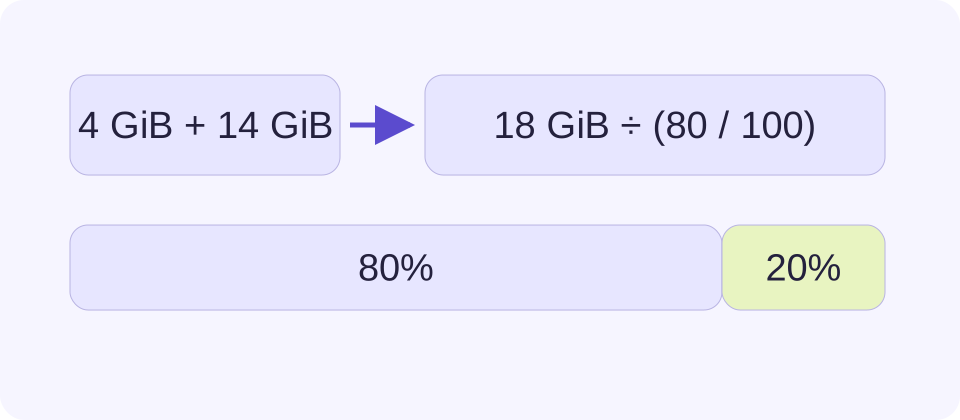
A 4 GiB baseline plus 14 GiB of concurrent applications totals 18 GiB. To leave 20% of target capacity unused, provision 22.5 GiB. A 16 GiB system is 6.5 GiB below that chosen target.
Build a Budget for Work That Happens Together
Choose a real concurrent workload: the project, browser, communication apps and background tools used at the same time. A list of every application installed is not the same thing. Measure several representative sessions and include the busy point that matters, such as opening the working document or running a build.
Separate the baseline from the application amount. One approach is to measure a background-only system, then estimate the additional non-overlapping load of the intended work. Cross-check the sum against whole-system use during that work. Do not enter a whole-system total as the baseline and then add its processes again.
Keep the Measurements Comparable
Use the same units and memory meaning for both parts of the budget. Resident memory is not interchangeable with virtual address space, committed memory or a file’s disk size. A program may map a large file without keeping all of it in physical RAM. Different monitoring tools can therefore show different legitimate figures.
Shared pages need particular care. Adding every process working set can count some physical pages several times, and separate threads do not imply separate copies of the same application. Where a clean breakdown is unavailable, a whole-system observation is a useful cross-check. The calculator cannot resolve ambiguous measurements or discover hidden allocations from a browser.
A Reserved Fraction Is Different from an Added Margin
The selected reserve is a share of the target capacity. An 18 GiB budget occupies 80% of 22.5 GiB, so a 20% reserve requires 22.5 GiB. Simply adding 20% would give 21.6 GiB and would not leave the same unused fraction. Neither choice is a universal recommendation; record the reason for the assumption.
A result between common memory kit sizes is a mathematical target, not a compatible product. Compare suitable configurations only after checking the device’s supported capacity, memory generation, slots and upgrade options. The result does not identify soldered memory or approve mixing modules.
| Item | Value |
|---|---|
| System/background baseline | 4 GiB |
| Concurrent application budget | 14 GiB |
| Combined workload | 18 GiB |
| Target with 20% reserved | 22.5 GiB |
| Shortfall against that target with 16 GiB installed | 6.5 GiB |
Confirm That Capacity Is the Actual Problem
Review how the system behaves during the workload. Memory pressure, repeated disk-backed paging and visible pauses can be useful evidence. A high occupied-memory percentage alone is not a diagnosis, because useful cache and memory compression affect the reading. On macOS, review Activity Monitor’s memory pressure rather than judging the free-memory number alone.
More RAM does not fix every slowdown. CPU limits, storage latency, temperature, graphics memory or a single overloaded application can still matter. This page does not produce a bottleneck percentage or a speedup prediction. Re-measure after changing the workload and compare the same task before and after an upgrade, rather than treating an estimated capacity surplus as proof of improved performance.
What the Result Means
Shared pages, caching, compression and changing workloads make exact RAM demand more complex than a simple sum. Do not count total system use and its applications twice. This calculator cannot certify compatibility, identify a bottleneck or promise faster performance.
Common Questions
Can This Detect My Installed RAM?
No. Enter the installed amount from your operating system or hardware specification. Browser memory hints are not exact installed-capacity measurements.
Does High Memory Use Always Mean I Need More RAM?
No. Check actual responsiveness, memory pressure and disk-backed paging during a representative workload. Occupied memory can include useful cache.