How to Use This Tool
- Enter the upload and download Mbps required per local call or endpoint.
- Count endpoints using this connection at the same time, not everyone attending the remote meeting.
- Add an optional planning margin; 0% leaves the entered rates unchanged.
Calculation Method
For each direction, planned Mbps = per-endpoint Mbps × simultaneous endpoints × (1 + margin ÷ 100). Upload and download are separate requirements; adding them does not produce a valid one-direction speed requirement.
Worked Example
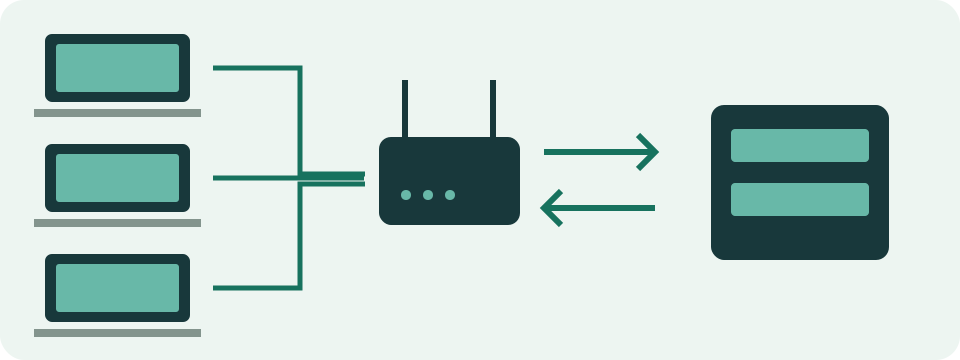
Three endpoints using 2 Mbps upload and 3 Mbps download each need 6 Mbps up and 9 Mbps down. With 20% additional capacity, the totals are 7.2 and 10.8 Mbps.
Plan the Devices Sharing One Connection
Count devices actively joined to calls through the connection being planned. Two laptops in a home can be two endpoints. One person joining separately on a laptop and phone can also create two endpoints. Twelve people attending through one room system are not twelve local endpoints; use that room system's relevant rate profile for its one connection.
Remote attendees are not another automatic multiplier. Their presence can affect layout and the service's chosen media, but they do not each become a separately joined device on your local router. The calculator's starting values of 2 Mbps upload and 3 Mbps download are editable examples. They are not labelled as a current Zoom, Meet or Teams preset.
Choose a Rate with a Defined Meaning
Use an applicable service requirement or a measured rate for the mode being investigated. Identify the service, client, meeting type and reference column. A minimum, recommended capacity and observed average are different quantities. A recommendation helps plan capacity; it does not say that the application consumes that amount continuously. Retain those labels when recording a calculation.
The reference table illustrates this distinction with current desktop Zoom group 720p guidance and Teams' recommended meeting-video row, checked on 9 October 2026. Their figures are scoped references, not guarantees of actual quality. Platform documentation can change. Check its current conditions, including layout and screen sharing, before reusing a saved planning example for another client or operating mode.
| Reference and meaning | Upload Mbps | Download Mbps |
|---|---|---|
| Zoom desktop group 720p: recommended | 2.6 | 1.8 |
| Teams meeting video: recommended per endpoint | 2.5 | 4 |
Work Upload and Download Separately
Upload carries the media sent from local devices; download carries media received by them. Each direction has its own calculation and result. Multiplying a per-endpoint upload by the local endpoint count gives base upload. Apply the same process to download. Do not add the two results and compare that sum with a single advertised download speed.
For two endpoints using Zoom's group-720p reference of 2.6 Mbps up and 1.8 Mbps down, base requirements are 5.2 Mbps up and 3.6 Mbps down. A chosen 25% addition gives 6.5 Mbps up and 4.5 Mbps down. The margin is our illustrative choice, not a percentage prescribed by that reference. Both directions remain visible rather than being reduced to one ambiguous bandwidth total.
Compare the Smaller Direction as Carefully as the Larger
A connection observed at 100 Mbps download and 5 Mbps upload has a smaller outgoing capacity. Compared with the example above, the 5 Mbps upload is below the selected 6.5 Mbps planning target even though download exceeds 4.5 Mbps. That comparison identifies a numerical mismatch with the assumptions. It does not establish the cause of an actual call failure.
Cloud backups, file submissions and broadcasts can also compete for upload. Downloads and other viewers can compete for the receiving side. This form has no additional-traffic field. Calculate such work separately and compare like directions when considering simultaneous use. Activities that happen at different times do not need to be counted as concurrent simply because they use the same internet subscription.
Handle Mixed Devices and Meeting Modes
The form assumes the same entered pair of rates for every counted endpoint. Mixed groups need separate runs. Two endpoints at 2.6 Mbps up and 1.8 down plus one hypothetical endpoint at 1 Mbps up and 2 down give 6.2 Mbps upload and 5.6 Mbps download before any margin. Add uploads together and downloads together, keeping each group's assumptions.
A camera-off call, a gallery layout and shared moving content can behave differently. Screen sharing is not always a fixed percentage added to every video call. Follow the service's relevant reference or observe the actual mode. Avoid adding an audio rate again when the selected measurement already includes audio. A room system's requirements are also not automatically the same as a laptop's.
Use a Margin as a Planning Allowance
A 20% margin multiplies each base requirement by 1.2. It adds capacity to the arithmetic model; it does not force the call to send more data. Zero margin leaves the selected rates unchanged. Neither choice guarantees smooth sound or video. A margin also does not reserve resources inside a router or correct every wireless, routing or service problem.
Capacity and monthly consumption need different information. A hypothetical constant 2 Mbps upload plus 3 Mbps download for one hour represents 2.25 decimal GB of total traffic. A 20% capacity margin does not automatically turn that into 2.7 GB actually used. Use an appropriate average and duration in the data-usage calculator when the question concerns an allowance rather than simultaneous connection capacity.
Check the Actual Call Before Relying on a Plan
Test the expected number of local devices at the relevant time and observe application statistics where available. Note meeting mode, connection type, delay, loss and any changing quality. A browser speed test to another endpoint cannot prove the media service's complete path. This site's HTTP timing check likewise reports its own request measurements, not a direct measurement of a call's media jitter.
Separate device-input problems from delivery problems. Microphone, speaker and webcam checks can help observe local capture or playback with their stated permissions and limits; they do not certify a complete meeting. The bandwidth form requires at least one whole local endpoint and nonnegative rates. A zero rate means zero assumed traffic in that direction, not evidence that every real call can work without it.
What the Result Means
Services adapt quality to network conditions, layout and settings. This calculator does not measure latency, jitter or loss and cannot guarantee call quality.
Common Questions
Should I Multiply by All Meeting Participants?
No. Count only local active endpoints sharing the connection being planned. A laptop and phone joined separately count twice.
Where Should the per-Call Rates Come From?
Use current requirements for the service and mode, or observed endpoint statistics. There is no universal rate for every platform.