How to Use This Tool
- For dimensions to MP, enter the image width and height in whole pixels.
- For MP to dimensions, enter the target megapixels and width-to-height ratio.
- Read MP and total pixels in forward mode. In reverse mode, read approximate dimensions, MP after rounding and actual ratio.
Calculation Method
Megapixels = width × height ÷ 1,000,000. For target pixel count P and ratio r = width ÷ height, width = √(P × r) and height = √(P ÷ r). Reverse results are rounded to whole pixels.
Worked Example
4000 × 3000 pixels equal 12 MP at 4:3. A target of 24 MP at 3:2 gives 6000 × 4000 pixels. Other targets can produce a slightly different count after rounding.
Use the Current File Dimensions
Pixels to MP takes an image's width and height in whole pixels. Use the dimensions of the file being assessed, including a cropped or exported version. Do not substitute browser-preview size, paper dimensions, file bytes or the camera's advertised MP rating. The calculator receives numbers; it does not open an image, inspect a sensor or read metadata automatically.
Multiply width by height for total pixels, then divide by one million for MP. A 4000 × 3000 file contains 12000000 pixels: 12 MP at 4:3. Swapping to 3000 × 4000 preserves quantity and gives 3:4. MP measures area in pixels. The two dimensions also describe shape and orientation, information the total alone cannot provide.
Supply a Ratio for MP to Pixels
An MP total cannot identify one unique width and height. In reverse mode, enter a positive target and two separate ratio numbers. For 16:9, enter 16 for ratio width and 9 for height. Reversing them requests portrait dimensions. A ratio of 1.5 to 1 represents the same proportion as 3 to 2 before whole-pixel rounding.
The calculation sets P = target MP × 1000000 and r = ratio width ÷ ratio height. Unrounded width is square root of P × r; height is square root of P ÷ r. Each dimension then rounds independently to the nearest whole pixel. A target of 24 MP at 3:2 gives 6000 × 4000 exactly. Other combinations can produce a slightly changed count and ratio after rounding.
Check the Rounded Result
Ten MP at 16:9 gives unrounded sides of about 4216.370214 × 2371.708245. The returned integers are 4216 × 2372. Their product is 10000352 pixels, so MP after rounding is 10.000352 and the exact integer ratio is 1054:593. That unfamiliar ratio describes the returned grid precisely instead of repeating the requested 16:9 label.
Rounding can also fall below a target: 12 MP at 3:2 returns 4243 × 2828, or 11.999204 MP. Those integers do not satisfy a strict 12 MP minimum. Check MP after rounding and actual ratio, then minimum side lengths or required pixel multiples separately. Reverse mode has no separate total-pixels row; multiply the returned sides to check that quantity. It is an estimate, not a strict constraint solver.
| Inputs | Returned pixels | MP | Reduced ratio |
|---|---|---|---|
| 4000 × 3000 | 4000 × 3000 | 12 | 4:3 |
| 24 MP; 3:2 | 6000 × 4000 | 24 | 3:2 |
| 10 MP; 16:9 | 4216 × 2372 | 10.000352 | 1054:593 |
| 12 MP; 3:2 | 4243 × 2828 | 11.999204 | 4243:2828 |
Check Crop and Export Dimensions Again
Cropping 4000 × 3000 to 4000 × 2250 leaves 9 MP at 16:9, removing one quarter of the original pixel area. Doubling both original sides to 8000 × 6000 gives 48 MP, four times the total. Changing a length and changing an area are different operations. The form calculates their numbers but does not crop, resize or save a picture.
Resampling to more pixels estimates new pixel values; a larger MP figure alone cannot prove more captured detail. After editing or export, read the saved file's dimensions rather than the original capture specification. Export presets can change dimensions again. Available metadata can help with supported files, but its absence is not a reason to replace actual dimensions with a camera rating or infer a quality score.
Separate MP, File Bytes and Print Density
MP counts pixels; MB counts stored bytes. Two 12 MP images can differ in file size because of format, compression, bit depth, content and metadata. This tool has no format or compression inputs and predicts no MP-to-MB conversion. A byte-based upload limit needs actual saved file size; minimum resolution needs pixel dimensions. A destination can require both, so check each separately.
Image PPI describes pixels per physical inch in a placement; printer DPI describes output dots. Changing density with resampling disabled leaves pixel dimensions and MP unchanged. At a chosen 300 PPI, 4000 × 3000 corresponds to about 13.33 × 10 inches. At 200 PPI it is 20 × 15 inches, still 12 MP. These are explicit layout examples, not print-quality approval or additional form controls.
Resolve Entry Errors and Exact Constraints
Type 4000, not 4,000, 4.000 or 4000 px for a four-thousand-pixel side. Inputs reject thousands grouping and unit suffixes; a decimal point is a decimal separator. Positive decimal targets and ratio components are allowed, while forward pixel dimensions must be positive whole numbers. Very small targets or extreme ratios can round a side to zero and become invalid. Unsupported numerical ranges return errors.
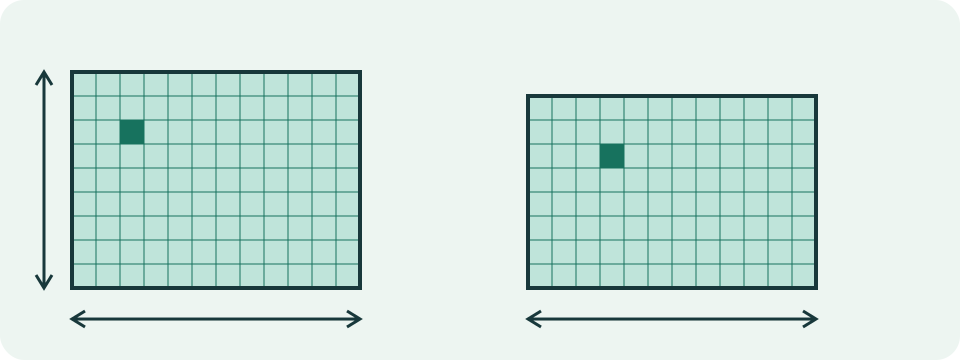
Exact ratio, minimum MP, minimum width and minimum height are separate constraints. Nearest rounding does not guarantee all at once or select a camera's output mode. For non-square video pixels, stored width-to-height ratio can differ from displayed shape. Read the destination's actual specification and check the final file before treating arithmetic conversion as acceptance. The conceptual grid illustration explains proportions, without asserting equal pixel quantities in its two shapes.
What the Result Means
A nominal camera MP figure cannot reveal its exact output dimensions. Cropping and resampling change pixel counts; more pixels alone do not prove greater captured detail.
Common Questions
Does 12 MP Determine One Width and Height?
No. The aspect ratio is also needed. Different shapes can contain the same total number of pixels.
Is a Megapixel 1,048,576 Pixels?
No. This calculator uses the decimal definition: one megapixel is one million pixels.