How to Use This Tool
- Enter the observed sample peak in dBFS from the recording or meter being compared. Use a finite value at or below 0, and keep the measurement stage and meter mode consistent.
- Enter the chosen target sample peak at or below 0 dBFS. The target belongs to your workflow; the calculator does not select a universal recording level or hardware setting.
- Calculate the signed gain, amplitude multiplier and modeled target margin. After any actual adjustment, check a new reading at the same stage. Future peaks and processing can differ.
Calculation Method
Gain in dB = target dBFS − observed dBFS. The linear amplitude multiplier is 10^(gain/20). Positive gain increases sample magnitudes; negative gain reduces them. The modeled margin to 0 dBFS is 0 − target. This is a constant linear-gain calculation, not a loudness or true-peak measurement.
Worked Example
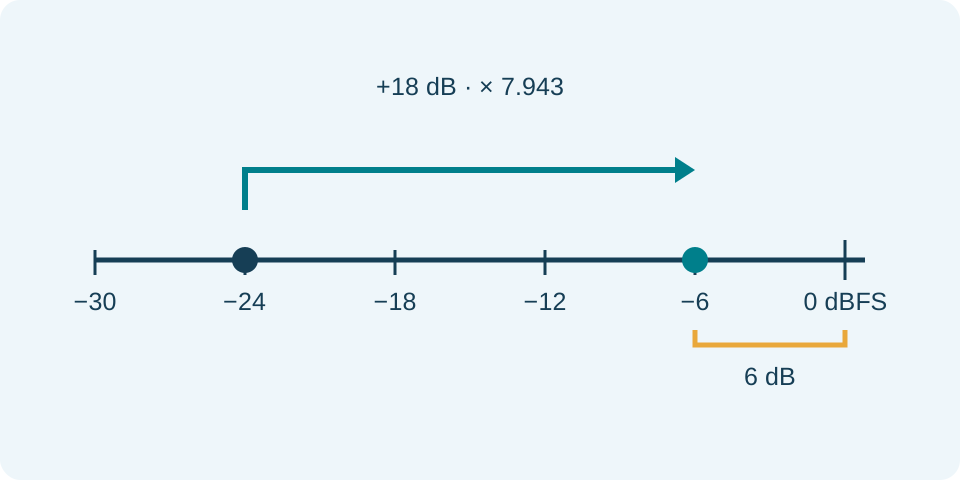
An observed −24 dBFS peak and a −6 dBFS target give +18 dB of gain, an amplitude multiplier of about 7.943, and a 6 dB modeled margin. The predicted peak reaches −6 dBFS only under the unchanged linear model.
Enter Comparable Digital Peak Readings
Enter the observed peak and the desired target in dBFS, including their minus signs. Both must be finite numbers at or below zero. Use readings from the same digital meter and signal path. A peak value is not the average level, a LUFS loudness reading, microphone sensitivity or an acoustic sound-pressure measurement. Combining different kinds of readings produces an arithmetic result without a useful interpretation for this task.
Take a representative recording or meter observation with the intended speaking position, input and processing. A brief quiet phrase can miss the loudest part of the performance. Note automatic gain, compression and other processing that can change the relationship between observations. This calculator accepts your readings manually; it does not start the microphone, select an audio device, analyze a recording or adjust the physical preamp. The separate microphone test supplies a browser observation with its own limits.
Understand Adjustment, Multiplier and Margin
The adjustment is target minus observed peak. Its amplitude multiplier is 10 raised to adjustment divided by 20. This is an amplitude relationship, not the power-ratio formula with a divisor of 10. The modeled peak equals the entered target, and its margin to zero is the negative of that target. These outputs describe uniform linear gain applied to the entered level; they do not measure a finished waveform or a physical device.
For an observed −30 dBFS and target −12 dBFS, the adjustment is +18 dB. The multiplier is about 7.9432823 and the target margin is 12 dB. For −6 dBFS toward the same −12 target, the adjustment is −6 dB, about 0.50118723 times the amplitude. A negative adjustment is a reduction, not an error. Equal observed and target readings give zero adjustment and a multiplier of one.
Keep a Target Margin for the Actual Task
The target is a choice, not a universal recommended recording level. A target of zero gives no modeled margin and prompts a full-scale warning. The arithmetic can reach zero, but the tool does not establish that a particular encoder, analog input, floating-point processing chain or converted signal remains distortion-free. Sample peaks and reconstructed true peaks answer different questions; no true-peak calculation is performed here.
Reserve room for the actual performance and the next processing stage, then verify that choice in the recording application. A future louder phrase can exceed the observed peak. Applying +18 dB to a different recording is not justified simply because one earlier phrase needed it. Keep the original reading and settings with the result so a repeated calculation refers to the same task rather than to an unexplained gain number.
Apply and Verify Outside the Calculator
Make an appropriate adjustment in the device or software that actually controls the signal and observe it again. A knob position, percentage slider and dB control are not interchangeable scales. The returned +18 dB does not identify a corresponding position on an unlabeled hardware knob. Change a known control deliberately and take a fresh reading, keeping the microphone distance and test phrase comparable. The tool cannot confirm that the adjustment was applied.
Uniform digital gain scales signal and existing noise together. It does not recover peaks clipped earlier, remove room noise or repair a distorted analog stage. Reducing the level after clipping can make the file quieter while leaving the distortion. Check the affected stage rather than treating a negative gain result as a repair. Changes to distance, input hardware or processing require a new observation instead of reusing an old calculation.
Resolve Invalid and Extreme Inputs
Blank entries, positive dBFS values and non-finite numbers are rejected. Extremely separated values can exceed the representable multiplier and produce a numerical-limit message. This is a calculation bound, not a measured preamp limit. Editing either input clears the previous result so it is not presented as a calculation for the revised readings. Reset clears both readings and the result. Use the digital-level guide for the distinction between meters, gain and recording headroom.
What the Result Means
Gain can amplify existing noise and cannot restore clipped samples. Compression, limiting, automatic gain control and new input peaks change the result. A sample-peak margin does not certify freedom from intersample peaks or analog overload. No knob percentage, voltage level, SPL or dBA is inferred. Unsupported numeric extremes are rejected.
Common Questions
Does 0 dBFS Mean Silence?
No. It is the full-scale reference for this sample-peak model. Digital silence has zero amplitude and no finite logarithmic peak reading.
Can I Enter LUFS, RMS or a Spectrum-Bin Value?
Those use different measurement definitions. This model expects a sample-peak dBFS reading; do not treat other meter modes as interchangeable.