How to Use This Tool
- Choose PCM or entered-bitrate mode.
- Enter duration and the PCM format or the total compressed bitrate.
- Read payload size and allow separately for file metadata and containers.
Calculation Method
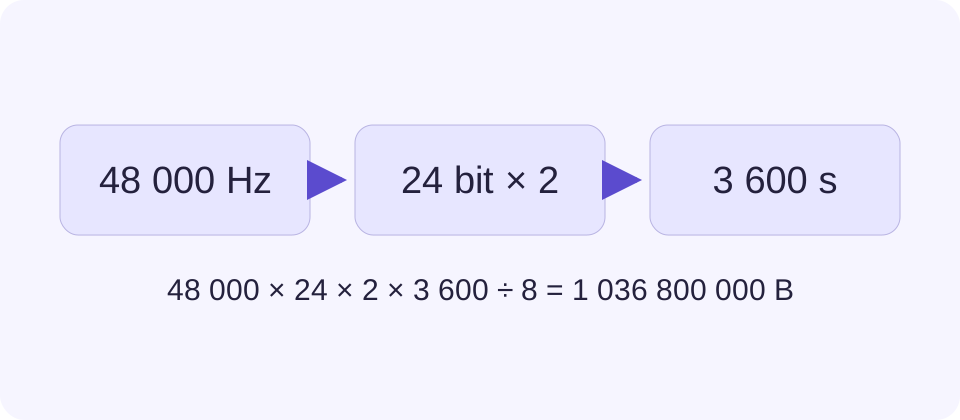
PCM bytes = sample rate in Hz × stored bits per sample × channels × seconds ÷ 8. Compressed payload bytes = total bitrate in kbps × 1000 × seconds ÷ 8.
Worked Example
Ten minutes of 48 kHz, 24-bit stereo PCM uses 172,800,000 sample-data bytes, or 172.8 MB. At 192 kbps total bitrate, ten minutes is 14.4 MB before overhead.
Choose the Model That Matches the Recording
PCM stores sample values directly. Its sample-data size follows the chosen sample rate, stored bit width, number of channels and duration. Compressed formats such as MP3 or AAC need an actual or planned total bitrate instead. Choosing a filename extension does not reveal that bitrate, and the same extension can hold files of very different sizes.
Use hertz consistently: 48 kHz is 48,000 samples per second per channel, not 48. For a stored 24-bit PCM sample, each channel contributes three bytes per sample. A mono recording has one channel; stereo has two. Track count is a separate project concern, especially when a session includes alternate takes or duplicates.
Verify the PCM Arithmetic
For ten minutes, convert duration to 600 seconds. A 48,000 Hz, 24-bit stereo recording gives 48,000 × 24 × 2 × 600 ÷ 8 = 172,800,000 bytes of sample data. Dividing by 1,000,000 gives 172.8 MB; dividing by 1,048,576 gives approximately 164.795 MiB. The bytes have not changed between those two displays.
Use the stored container width when valid sample precision differs from storage width. For example, samples with 20 valid bits stored in 24-bit containers occupy three bytes per channel sample, not two and a half. This tool does not read a file to discover that detail. Check the recording or export format rather than guessing from a quality label.
Use the minute input for the whole recording, including any intended silence. Fractional minutes are allowed: 0.5 minute is 30 seconds. Do not enter 1.30 to mean one minute and thirty seconds; that duration is 1.5 minutes.
Use Total Bitrate for Compressed Audio
A known 192 kbps total audio bitrate means 192,000 bits per second for the stream. Over 600 seconds, that gives 14,400,000 bytes, or 14.4 MB before container overhead. Do not multiply this total bitrate by the stereo channel count again. That would double-count channels already included by the encoder.
For variable bitrate, a measured average across the complete file can support a useful estimate. A maximum or nominal quality setting is not necessarily that average. Lossless compression also depends on content, so a universal FLAC percentage would create false precision.
| Entered Settings | Calculated Bytes | Decimal Size |
|---|---|---|
| 48 kHz, 24-bit, mono PCM | 86,400,000 | 86.4 MB |
| 48 kHz, 24-bit, stereo PCM | 172,800,000 | 172.8 MB |
| 192 kbps total bitrate | 14,400,000 | 14.4 MB |
Account for What the Estimate Excludes
A real file includes structure beyond sample data: headers, metadata and sometimes embedded artwork or padding. Those bytes are not a fixed percentage across all formats. Keep the calculated payload separate and inspect an actual export when a strict attachment or upload limit matters. The tool does not reserve space for every possible metadata choice.
A recording project can use far more disk space than its final mixed file. Count separate tracks, takes, rendered intermediates and backups individually. Multiplying a stereo mix size by an arbitrary project factor is less informative than listing the recordings you will actually keep.
Compare Size Without Scoring Sound Quality
Changing a PCM input changes storage predictably, but it does not prove an audible improvement. Microphone quality, recording level, source noise and processing are outside this calculation. A larger compressed file can also contain a poor source. Use listening checks and technical export requirements alongside the arithmetic.
For an email limit, the attachment may grow when encoded for transport. For transfer planning, use the final byte size rather than sample rate. These next checks solve different limits without changing what this audio payload calculation measures.
What the Result Means
This is arithmetic on settings, not an audio inspection or encoder. Variable bitrate, tags, artwork, padding and file containers can change actual size. It does not predict sound quality.
Common Questions
Do I Multiply a Stereo MP3 Bitrate by Two?
Not when the entered bitrate already describes the whole audio stream. Channel multiplication belongs to the PCM calculation.
Can I Predict FLAC Size from Sample Rate Alone?
No. Lossless compression depends on the source. Use a measured average bitrate for an estimate.