How to Use This Tool
- Enter the average video bitrate in Mb/s and audio bitrate in kb/s. Use 0 for a video without audio. Keep audio separate from the video stream rate to avoid counting it twice.
- Enter a positive duration in seconds, then a nonnegative allowance percentage. Use the allowance for an explicit planning margin, not an assumed universal container overhead.
- Calculate and compare payload bytes with the total including the allowance. Check the stated unit before comparing the result with storage or upload limits.
Calculation Method
Estimated payload bytes = (video Mb/s × 1,000,000 + audio kb/s × 1,000) × seconds ÷ 8. The entered allowance multiplies that payload by 1 + percentage/100. MB and GB divide bytes by powers of 1,000; MiB and GiB use powers of 1,024.
Worked Example
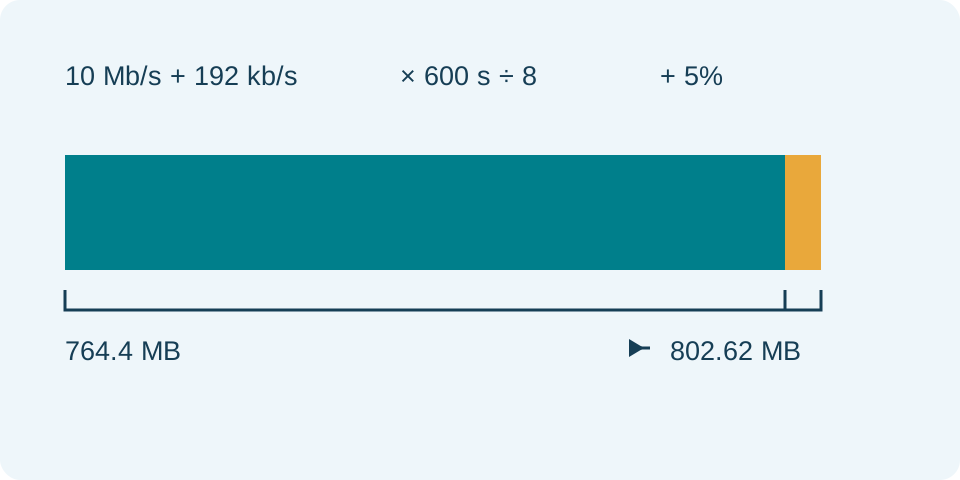
10 Mb/s video plus 192 kb/s audio for 600 seconds produces 764,400,000 payload bytes, or 764.4 MB. A 5% allowance brings the estimate to 802.62 MB, approximately 765.44 MiB.
Supply Average Rates and Seconds
Enter video bitrate in decimal Mbps, audio bitrate in decimal kbps and duration in seconds. These fields use different rate scales: 1 Mbps is 1,000 kbps. A three-minute clip needs 180 in the duration field, not 3 or a colon-separated time. The calculator does not open a video, measure its bitrate or infer a rate from resolution and frame rate. Obtain the relevant average rate from the intended export settings or an actual file report.
Enter video and audio separately only when the source distinguishes them. A reported total bitrate can already include audio; adding audio again would count it twice. The audio field starts at zero, which means no audio has been budgeted, not that every video is silent. Video rate and duration must be positive; audio and the percentage allowance may be zero. Invalid, negative or nonfinite values prevent an estimate. A changed input clears the previous result until calculated again.
Follow Bits to Bytes Without Mixing Units
The payload formula is (video Mbps × 1,000,000 + audio kbps × 1,000) × seconds ÷ 8. The two rates first become bits per second, then multiplication by duration gives bits. Dividing by eight gives bytes. This is an arithmetic estimate for the rates entered, not a quality assessment. Resolution, codec, frame rate and scene detail affect which rate is suitable, but none is an extra multiplier in this form.
For video at 2.4 Mbps and audio at 160 kbps, the combined rate is 2,560,000 bits per second. At 180 seconds, that is 460,800,000 bits or 57,600,000 bytes. Adding the two raw input numbers as 2.4 + 160 would combine different units. Likewise, using minutes directly would underestimate this clip by a factor of 60. Preserve the rate source and units when comparing two estimates.
Make the Percentage Allowance Explicit
The allowance increases payload by its entered percentage: estimated bytes = payload × (1 + allowance / 100). A value of 10 means an additional ten percent, not ten bytes, ten MB or a final ten-percent total. In the example, 10% adds 5,760,000 bytes to the 57,600,000-byte payload, yielding 63,360,000 estimated bytes. At zero allowance, estimated size equals payload; no container or other overhead has been added.
This percentage is a planning choice. The calculator does not measure container headers, metadata, subtitles, multiple audio tracks or an encoder's exact output. Establish which items the entered rates already include before adding an allowance. Do not add a published total-file overhead again without checking its basis. A larger allowance raises the estimate without changing the intended picture or predicting better quality. Record the percentage rather than presenting the result as a measured file size.
Read Decimal and Binary Outputs Correctly
The example's estimated bytes equal 63.36 MB or 0.06336 GB. In binary units they equal 60.4248046875 MiB or approximately 0.0590085983 GiB. These are alternative displays of the same quantity, not separate sizes to add together. Decimal MB divides bytes by 1,000,000; binary MiB divides by 1,048,576. A system showing a smaller binary number has not necessarily removed data or compressed the video.
Savvy Toolkit displays payload bytes, estimated bytes and both unit families. The displayed values can be rounded, while the underlying formula uses the entered numbers. Compare exact bytes for a close attachment or storage limit. A provider using an unspecified label needs its rule checked separately. The calculation does not enforce an export preset or promise acceptance by a video host, email service or storage system merely because the estimated number is below a chosen budget.
Account for Variable Bitrate and Final Exports
A variable-bitrate export does not maintain its peak rate for every second. An appropriate average is needed for a whole-file estimate. A target rate and a maximum rate describe different constraints, and an encoder may not achieve the target exactly. Two clips with the same duration and resolution can differ in size because their content and encoding settings differ. This form does not predict that variation or calculate the bitrate needed to hit a target size.
Measure the completed export before a strict submission. Use its actual byte size for attachment planning or transfer-time calculations, and keep encoding time separate from network upload time. Reset returns audio and allowance to zero and clears the other inputs. The video-size guide covers selecting a rate, comparing exports and planning storage without turning a bitrate estimate into an exact promise about the finished file.
What the Result Means
A target or maximum encoding bitrate may differ from the actual average. Variable bitrate, additional tracks, metadata and container structure can change the final size. Resolution and frame rate alone do not determine a compressed file’s size. The allowance is user supplied, not measured.
Common Questions
Can I Use an Overall File Bitrate as the Video Bitrate?
An overall rate may already include audio or container bytes. Do not add them again. This model expects separate video and audio averages, plus a stated allowance.
Why Do MB and MiB Show Different Numbers?
1 MB is 1,000,000 bytes; 1 MiB is 1,048,576 bytes. Both results describe the same estimated quantity with different units.