How to Use This Tool
- Choose pixel density and size, or aspect ratio only. The ratio mode does not need a physical diagonal.
- Enter the native horizontal and vertical pixel counts from the panel specification.
- For pixel density, enter the active diagonal in inches, excluding the frame.
- Read the density, physical dimensions and width-to-height ratio.
Calculation Method
PPI = √(width pixels² + height pixels²) ÷ diagonal inches. Physical width and height equal their pixel dimensions divided by PPI. Reduce the pixel ratio by dividing both counts by their greatest common divisor.
Worked Example
A 1920 × 1080 panel with a 24-inch active diagonal has about 91.79 PPI. Its estimated active size is 20.92 × 11.77 inches and its ratio is 16:9.
Match the Inputs to One Panel
Use the panel's native horizontal and vertical pixels plus its active diagonal in inches. Native counts describe the physical panel, not the browser window or a lower output mode. All three inputs must belong to the same screen. Combining a laptop diagonal with an external monitor's resolution produces a plausible number that describes neither. Rounded advertised dimensions should remain approximate.
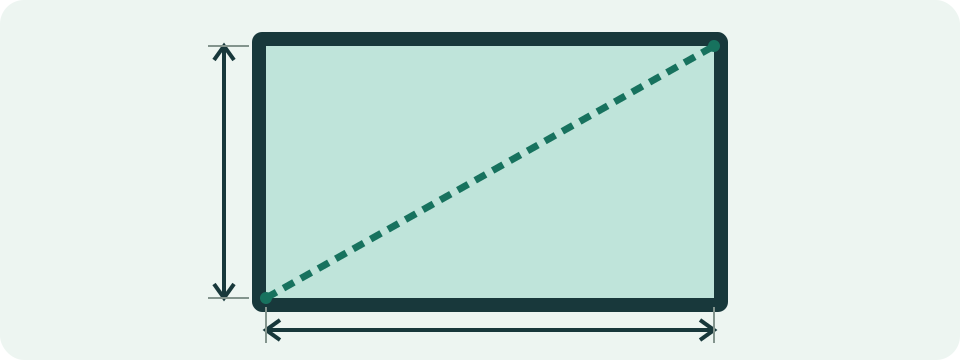
For a measured active diagonal, go between opposite corners of the lit rectangle and exclude the frame, case and stand. Convert centimetres to inches by dividing by 2.54 before entry. A 60.96 cm diagonal is 24 inches. Entering 60.96 in the inch field assumes a screen 2.54 times larger and lowers density by that factor. The tool does not infer units from numbers.
Choose Density or Ratio Only
Pixel density and size mode uses all three inputs. It returns PPI, estimated active width and height in inches and centimetres, and a reduced width-to-height ratio. Aspect ratio only uses two pixel counts, hides the diagonal and returns the ratio and total pixels. That ratio has no physical size attached. Neither mode detects a display or resizes an image.
Match orientation too. A landscape 1920 × 1080 rectangle is 16:9; portrait 1080 × 1920 is 9:16. With the same diagonal, PPI stays unchanged while active width and height swap. Ratio reduction divides both counts by their greatest common divisor. An unfamiliar ratio can be exact: 3440 × 1440 reduces to 43:18 rather than precisely 21:9, regardless of the broad marketing label.
Understand PPI and Active Dimensions
PPI means pixels per physical inch along a side, assuming square pixels. First find the pixel diagonal: square root of width squared plus height squared. Divide it by the active inch diagonal. For 1920 × 1080, the pixel diagonal is about 2202.90717. Dividing by 24 gives 91.78779875 PPI, displayed as 91.79. Both pixel sides are needed, not just the horizontal count.
Active width is horizontal pixels divided by PPI; active height uses vertical pixels. This example gives about 20.92 × 11.77 inches, or 53.13 × 29.89 cm. Precision is retained before display rounding. Two decimal places make comparisons readable but do not make an advertised 24-inch diagonal a precise measurement. For desk, cabinet or mount clearance, use the manufacturer's full chassis dimensions rather than this active-area estimate.
| Pixels | Diagonal (in) | PPI | Active width × height (in) |
|---|---|---|---|
| 1920 × 1080 | 24 | 91.79 | 20.92 × 11.77 |
| 1080 × 1920 | 24 | 91.79 | 11.77 × 20.92 |
| 1920 × 1080 | 27 | 81.59 | 23.53 × 13.24 |
| 3840 × 2160 | 27 | 163.18 | 23.53 × 13.24 |
Compare One Change at a Time
Keeping 1920 × 1080 while increasing the diagonal from 24 to 27 inches lowers density from 91.79 to 81.59 PPI. The same grid covers a larger area. At a fixed 27-inch diagonal, changing to 3840 × 2160 doubles PPI to 163.18. Total pixels increase fourfold, while linear pixels per inch only double. Density and pixel quantity answer different questions.
These examples are arithmetic inputs, not tested product specifications. Compare real panels using each model's native counts and active diagonal. PPI alone does not rate colour, contrast, response time, glare or readability at a chosen text size. No universal density threshold here guarantees sharpness or comfort for every viewer and distance. A higher density may need different interface scaling for the same physical text size.
Distinguish CSS, Zoom and Panel Pixels
Operating-system scaling enlarges interface elements without adding physical panel pixels. Browser zoom changes the relationship between CSS coordinates and displayed pixels. CSS screen width and viewport width therefore differ from a manufacturer's native resolution. Device pixel ratio describes a browser coordinate relationship and can change with zoom or the active display. It supplies no physical diagonal for the PPI formula.
The CSS relationship of 96 pixels per CSS inch is a layout rule, not a physical screen measurement. A webpage ruler's drawn inch is not a verified real inch. Use native specifications and a matching physical diagonal here. For blurry text, inspect output resolution, scaling and rendering separately. A correct PPI result cannot identify the cause or inspect those operating-system settings.
Resolve Input Mistakes and Geometric Limits
Enter whole pixel counts without grouping, such as 1920 and 1080, plus a positive diagonal such as 24 or 23.8. Fractional diagonals are valid; fractional pixel counts are not. Low PPI often comes from centimetres entered as inches, another display's diagonal or scaled desktop counts used as native pixels. Correct the source values before rounding or comparing with a product listing.
The model assumes a rectangular active area with square pixels. Cutouts, rounded corners, unusual pixel shapes and curved-panel measurement conventions need matching manufacturer definitions. The diagram explains active diagonal versus frame; it is neither a ruler nor a scaled picture of the entered device. Use MP conversion for an image's pixel quantity and the HDMI/DisplayPort calculator for an output signal's data requirement.
What the Result Means
The geometry assumes a rectangular active area with square pixels. It does not rate colour, contrast or image quality. A rounded advertised diagonal makes the physical dimensions approximate.
Common Questions
Can I Use My Browser Window Dimensions?
No. CSS pixels and zoom are not the panel's native pixel count. Use the hardware specification.
Does Higher PPI Automatically Mean a Better Screen?
No. It describes pixel density. Viewing distance, scaling and other display properties also affect the experience.