Record the Drives and the Layout First
A RAID estimate needs the capacities of the drives that will actually belong to the array. Write one capacity per line, including repeated sizes, and keep a separate record of the physical drive labels. An empty bay, a spare kept on a shelf and a disk used for a separate backup are not active members. Including them makes the estimate larger without making that space available to the chosen array. The calculator cannot discover installed drives or confirm their condition.
Choose the layout that the storage system supports, rather than the one producing the largest number. Savvy Toolkit models RAID 0, 1, 5, 6 and 10 using the smallest entered drive as a common allocation size. It does not model SHR, RAID 50, RAID 60, JBOD or a collection of separate pools. A mathematical result is not a compatibility check for a NAS, operating system or controller. Confirm supported layouts and member limits in the documentation for the exact product.
Keep Every Capacity in One Unit
The GB or TB selector labels every number in the list and every capacity result. It does not convert numbers already entered. Four terabytes must therefore be entered as 4 with TB selected, or 4000 with decimal GB selected. Entering 4 and 4000 on separate lines cannot represent those two drives in different units. The smallest value will govern the model, creating a plausible but incorrect result. Rewrite the whole list when changing the unit basis.
Decimal capacity and binary display labels explain another common disagreement. One TB represents 1,000,000,000,000 bytes; one TiB represents 1,099,511,627,776 bytes. An estimate of 12 TB is about 10.914 TiB before any filesystem reservation. That change of label does not mean the drives lost data capacity during formatting. Use the drive-capacity converter to compare the same byte count, then investigate actual system reservations separately. Avoid subtracting a percentage merely to make two differently labelled numbers match.
Read the Five Results as a Ledger
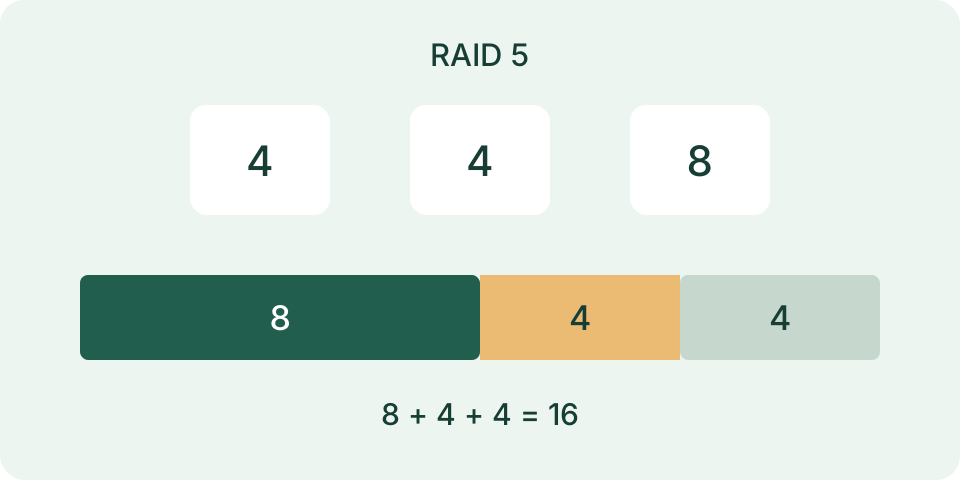
Raw capacity is the sum of the numbers entered. The smallest-drive result is the common size used for every member in this model. Usable capacity is the layout's mathematical data capacity before system and filesystem costs. Unused capacity is the extra size above that common allocation on larger drives. Redundancy capacity is the allocated space that does not count as usable data capacity. These results explain where the entered total went; none measures current free space or stored files.
The ledger should balance: usable capacity plus redundancy capacity plus unused capacity equals raw capacity. For matching drives, unused capacity is zero, but redundancy can still consume a substantial part of the allocation. For mixed drives, a large unused value and a large redundancy value describe different causes. Combining them under one vague overhead label makes the estimate harder to improve. The calculator reports a static layout, not a partition map or a guarantee about what a vendor will allocate.
Check a Mixed-Drive Example by Hand
Consider four active members of 4, 4, 6 and 6 TB. Their raw total is 20 TB and the smallest is 4 TB. The model allocates four lots of 4 TB, making 16 TB; the remaining 4 TB consists of the two larger drives' extra 2 TB portions. For RAID 5, usable capacity is three lots of 4 TB, or 12 TB. Redundancy is 4 TB. The ledger is therefore 12 + 4 + 4 = 20 TB.
Keep the same members and choose RAID 6: usable capacity becomes 8 TB, redundancy becomes 8 TB and unused space stays 4 TB. RAID 10 produces the same capacity ledger here, although its arrangement and failure rules differ. RAID 1 returns 4 TB usable in this full-mirror model; RAID 0 returns 16 TB with no redundancy allocation. Equal capacity does not make two layouts equivalent. These are independent planning examples, not recommendations or measurements of a configured device.
| RAID | Raw TB | Usable TB | Redundancy TB | Unused TB |
|---|---|---|---|---|
| 0 | 20 | 16 | 0 | 4 |
| 1 | 20 | 4 | 12 | 4 |
| 5 | 20 | 12 | 4 | 4 |
| 6 | 20 | 8 | 8 | 4 |
| 10 | 20 | 8 | 8 | 4 |
Respect Minimum Members and Pairing Rules
The form needs at least two positive drive capacities for RAID 0 or 1, three for RAID 5 and four for RAID 6. RAID 10 needs at least four and an even number of members. Zero, negative values, blank or malformed entries and unsupported arrangements do not produce a valid layout. The implementation also bounds list size and extreme totals. Accepted inputs establish mathematical validity only; a particular controller may impose tighter limits or support fewer mirror members.
RAID 10 is arranged as mirrored pairs with data distributed across the pairs. Losing both drives of one pair is a different situation from losing one drive in each of two pairs. This tool does not let you assign drives to pairs, simulate failures or assess an existing degraded array. Use the actual member map and system documentation for those questions. Do not interpret the capacity result as a promise that any two simultaneous drive failures are tolerated.
Compare Mixed-Drive Assumptions with the Product
The common-smallest rule is deliberate. It makes the calculator's allocation and unused tails explicit across all five supported levels. Some products allocate mixed RAID 0 drives differently. QNAP documentation, for example, describes summed capacity for its RAID 0 implementation, whereas this tool returns member count times the smallest size. A disagreement there is a model difference, not evidence that either drive is faulty. Use the product's own layout rules before treating a generic estimate as a purchase requirement.
Vendor-specific mixed-drive schemes can also make use of space that this calculation leaves unused. Savvy Toolkit does not implement those schemes or predict their expansion rules. Moving the larger drives into another group changes the layout and should be calculated as a separate group, with enough members for its chosen level. Do not simply add unused tails to usable capacity. Keep a note of the scheme, member list and software version beside each estimate so later comparisons use the same assumptions.
Allow for the Volume That Will Hold Files
Mathematical RAID capacity is an upper planning layer. The storage system may reserve space for its software, pool metadata, filesystem metadata, snapshots or other features. Those costs vary by product and settings. A vendor calculator can include reservations that Savvy Toolkit intentionally does not apply. Compare the same stage: raw disk total, array data capacity, pool capacity, volume capacity and current free space are different quantities. The storage manager's actual volume information is the evidence for a configured system.
For a provisional project budget, subtract a separately documented reserve from the estimate. Taking a chosen 1.5 TB reserve from the example's 12 TB leaves a 10.5 TB planning ceiling. That is your assumption, not a measured formatting cost or a control offered by the RAID form. Total the files, versions and expected growth separately with the storage-space calculator. Leave the reserve visible rather than hiding it inside altered disk sizes or an invented universal percentage.
Keep a Recoverable Copy Outside the Array
Redundancy addresses a member-drive failure within a supported layout. It does not provide an older copy after an unwanted deletion, replacement or damaging edit. A second copy mirrored immediately can preserve the same mistake. A backup plan needs a separate destination, an intentional schedule and a way to retrieve a previous useful version. Write down which files are covered and which are excluded. The RAID capacity calculation neither creates backups nor checks that any existing backup can be restored.
Choose a small representative restore task before relying on that plan: retrieve a file to another location, open it with the relevant application and compare its contents with a known copy. Preserve the original while testing. Record the backup date and the steps required to access it, including credentials managed outside this calculator. Backup capacity and retention should be estimated separately from the working array. A second destination inside the same pool does not establish protection against loss of that entire pool.
Separate Rebuild Planning from Copy Planning
A rebuild reconstructs array redundancy; a normal backup copy transfers selected files. Their elapsed times cannot be inferred from the same capacity number. This calculator does not predict rebuild duration, operating temperature, error risk or workload performance. Actual system progress and its documentation are the appropriate references during recovery. Avoid changing a live array merely to test a capacity estimate. Preserve the existing member information and a verified backup before considering an operation that changes stored data.
For a separate file copy, use the bytes that must be copied and a rate measured on the relevant path. The USB transfer and upload-time tools estimate that specific transfer under entered assumptions, not RAID recovery. Check that the destination has enough space, allow time to verify the copied files and keep preparation outside the transfer result. Network, enclosure, drive and workload constraints can all matter. The capacity ledger identifies a space budget; it cannot select a transfer speed for that budget.
Finish with an Auditable Capacity Record
Save the active member sizes, unit, RAID level, smallest-drive assumption and five results together. Add the exact storage product and its documented allocation rules when the plan concerns real equipment. Keep the file budget, reserve and backup destination as separate lines. This short record makes the estimate reproducible and exposes a changed input when another result differs. The page calculates entered numbers locally; it does not upload a drive inventory, edit partitions or prove that the hardware is healthy.
Before an expansion, check the product's supported migration or replacement sequence and confirm the existing layout. Replacing one larger drive does not automatically increase this model's common size while smaller members remain. Recalculate the intended final member list, then compare it with the product's actual rules. Never delete or recreate a volume simply because a generic estimate looks larger. The useful outcome is a documented capacity plan with explicit limits and a separate recovery plan, rather than a larger number alone.