Read a Data Label in Three Parts
A useful data label identifies the number, the unit and, for a rate, the time period. In 75 Mbps, 75 is the number, megabits are the unit and one second is the period. In 75 MB, there is no time component: it is a quantity of data. Comparing those numbers alone cannot tell you how long a file will take or how much storage it needs.
Write down the full label before opening a calculator. Keep an exact byte count when one is available. Also note where the value came from: a file listing, storage packaging, a speed test or an application. That short record prevents a quoted connection capacity from being mistaken for the sustained transfer rate of a particular file.
Bits and Bytes Explain the Factor of Eight
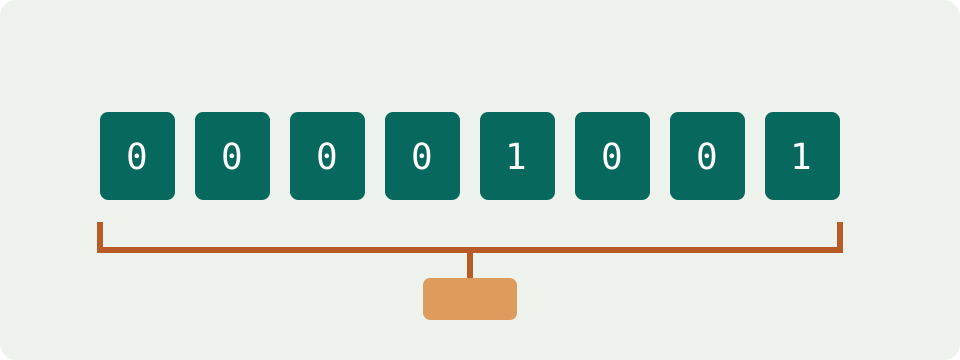
The small b in Mb/s means bits; the capital B in MB/s means bytes. One byte contains eight bits. With the same decimal prefix, convert Mbps to MB/s by dividing by eight. Convert MB/s to Mbps by multiplying by eight. Mbps, Mb/s and Mbit/s are alternative notations for the same bit rate.
For an independent example, 72 Mbps equals 9 MB/s. A file-transfer display of 9 MB/s is not reporting nine Mbps. This unit relationship says nothing about the connection's latency or reliability. It also does not establish that an advertised 72 Mbps rate will be sustained by a specific server. A conversion preserves the meaning of the input measurement or assumption.
Decimal and Binary Prefixes Use Different Scales
MB and GB use powers of 1,000; MiB and GiB use powers of 1,024. The extra i identifies a binary multiple. The reference table gives exact byte quantities, which are more dependable than saying that a unit is roughly a million or a billion bytes. A higher number of smaller units can describe the same stored data.
Some software labels shorten or blur that distinction. Check the application's documentation or exact byte count when the convention is unclear. Do not assume every screen in one operating system uses the same calculation. In French, Mo, Go, Mio and Gio are the corresponding byte quantities; the o means octet, the French term for byte. MB and Mo describe equivalent decimal quantities.
| Unit | Exact bytes |
|---|---|
| MB | 1000000 |
| MiB | 1048576 |
| GB | 1000000000 |
| GiB | 1073741824 |
Compare a Connection Result with an Application Rate
Convert both readings to the same unit before deciding that they disagree. A 240 Mbps result is equivalent to 30 MB/s. An application showing 28 MB/s is equivalent to 224 Mbps. Those observations can still differ because they came from different transfers or times. Matching units removes one source of confusion without identifying a network fault.
Steam's official support describes settings for displaying bits or bytes per second. Other applications need their own documentation checked. A display setting changes the number and unit, not the transferred data. Keep the original labels in any troubleshooting note so someone else can reproduce the conversion rather than guessing what the word speed meant.
Turn File Size and Rate Into a Duration
Divide bytes to transfer by bytes delivered each second. For a decimal example, a 2.7 GB file contains 2,700 MB. At a constant 9 MB/s, it takes 300 seconds, or five minutes. The same rate can be entered as 72 Mbps. The size and speed conventions must match before doing the division.
The calculation describes transfer time at the chosen rate. It does not add connection setup, waiting, pauses, retries or installation. A compressed download can expand after receipt, and an upload can require processing at the destination. Use the size of the bytes actually being transferred, not an installed folder's requirement or an estimate based only on video resolution.
The Same Bytes Can Produce Different Capacity Numbers
One trillion bytes equals 1 TB in decimal units and approximately 931.323 GiB in binary units. Changing that scale does not remove data or create free space. The conversion alone therefore cannot show that a drive is faulty, counterfeit or missing capacity. Compare exact bytes before drawing a conclusion from two differently labelled totals.
Available storage is another question. Formatting, the operating system, files, partitions and other allocations can leave less space for new files. Apple's storage guidance distinguishes packaging capacity from formatted capacity and operating-system use. A unit converter explains the scale difference; an actual storage report is needed to explain what currently occupies the device.
File Size and Allocated Disk Space Answer Different Questions
File properties can show a data size and a separate amount of disk space occupied. For planning a transfer, start with the data that the service will send. For checking local free space, consider the storage actually required by that operation. A conversion of units does not make those two values interchangeable.
A batch can also change during preparation. Creating an archive produces a new file with its own size. Exporting a video produces another size based on its settings. Read the completed output rather than reusing the sum of the source files as an exact prediction. For a transfer already underway, use remaining data; subtract values only when they describe the same stage and unit.
Additional Storage and Reserved Storage Are Different Percentages
Suppose 600 files average 4 MB each. The base estimate is 2,400 MB, or 2.4 GB. Adding a 25% allowance gives a planned 3 GB. That allowance is an assumption about extra data, not a measurement of future files. Use a representative sample of the intended files rather than a universal average photo or document size.
Reserving 25% of a 4 GB capacity leaves 3 GB for use. Although the final number is also three, the percentage applies to a different starting quantity. One calculation adds data to a requirement; the other subtracts a share of capacity. State the purpose of a percentage before comparing results from storage-planning and drive-capacity tools.
A Rate Is Not a Monthly Data Allowance
A sustained 6 Mbps file-data rate for 40 minutes moves 1.8 GB in decimal units: six million bits per second multiplied by 2,400 seconds, then divided by eight. This independent example describes constant active transfer. It is not a standard size for a film, game or video call, whose data use can vary.
A provider's allowance counter may follow its own measurement and billing rules. Check those rules before comparing a modeled payload with a recorded allowance. Download and upload may also be counted differently by the service. The data-usage calculator makes a rate-and-active-time assumption explicit; it cannot read your account or replace its recorded usage.
Email Can Change the Size of an Attachment in Transit
An attached file's local byte count need not equal the complete email message size. MIME Base64 represents three input bytes with four encoded characters before additional formatting and message information. That helps explain why a file below a message-size limit can still require a closer check. It is not evidence of an internet-speed problem.
Limits are service-specific. Gmail's current help distinguishes personal accounts from administrator-controlled work and school limits, and describes using a Drive link for oversized attachments. Check the actual service rule and the destination's requirements. The attachment checker estimates the selected size treatment; it does not send mail or guarantee that a server will accept a message.
Keep Rounding and Uncertainty Separate
Use exact definitions and retain intermediate values during calculations. Round the final output to a readable precision. A value of 83.7 Mbps becomes 10.4625 MB/s; using 10.46 is suitable for a quick display but can introduce a small difference in a later calculation. A measured rate changing from second to second has more uncertainty than that rounding difference.
Record the size, unit, direction, rate source and percentage assumption for any comparison. Recalculate when one of those changes. Choose the converter for a unit question, a time calculator for a file-duration question and a storage calculator for a capacity question. A result becomes useful when its inputs describe the task being planned, not merely when it contains more decimal places.