How to Use This Tool
- Read the exact metric name, technology and unit in the device’s status information. Use the device maker’s instructions; menus vary.
- Select 4G RSRP, RSRQ, SINR or RSSI, or 5G SS-RSRP, SS-RSRQ or SS-SINR. Enter the current numeric reading, preserving its sign.
- Optionally enter a comparison value for the same metric and reporting context. Keep the device, units and measurement settings consistent.
Calculation Method
RSRP measures reference-signal power; RSSI includes total received power, interference and noise. Both use dBm. RSRQ is a reference-quality ratio and SINR compares signal with interference plus noise; both use dB. A comparison reports current minus comparison in dB. It does not assign universal quality grades.
Worked Example
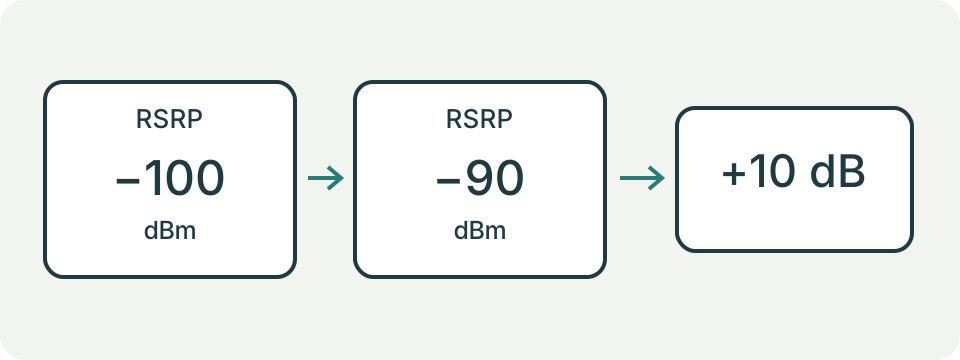
A current RSRP of −90 dBm compared with −100 dBm is 10 dB higher in the same reporting context. That means ten times the reference-signal power, not ten times the download speed.
Copy the Metric Name with the Reading
Choose 4G LTE or 5G NR synchronization-signal measurements, then select the named metric shown by the device's diagnostic page or trusted local utility. Enter the current reading and an optional earlier comparison. This page does not access the modem, cell tower, SIM, carrier account or location. It cannot extract measurements from signal bars. Leave an unavailable reading out rather than replacing it with zero. The technology and metric selectors define the meaning of the number; the same numeric value under another label is not an equivalent observation.
Separate Power from Quality
RSRP describes reference-signal power, while RSRQ is a quality ratio and SINR compares signal with interference and noise. LTE RSSI is a broader received-power observation. The form uses dBm for power and dB for ratios. A negative dBm value is valid; it does not mean negative physical power. A larger power reading can coexist with poor quality. Record the metrics together when the diagnostic source provides them, but enter one named metric per comparison. The tool does not combine them into a guaranteed throughput score or diagnose network load.
Match LTE with LTE and SS with SS
The NR option here is SS-RSRP, SS-RSRQ or SS-SINR. It is not a converter for CSI measurements or a generic five-generation signal scale. Compare readings from the same family and source method. A device can change cell, band or technology between observations, which makes a numerical difference harder to interpret. Record those changes outside the form when available. Do not compare LTE RSSI directly with NR SS-RSRP simply because both are expressed in dBm. Shared units alone do not make two measurements interchangeable.
Read the Direction of the Comparison
The displayed difference is current minus comparison. A current RSRP of -94 dBm and comparison of -101 dBm gives +7 dB. Reversing the entries gives -7 dB. The positive sign describes the increase in that named power reading; it is not seven extra megabits or a seven-percent improvement. For ratios, 8 dB current versus 3 dB comparison gives +5 dB. The result preserves the selected metric. A numeric increase by itself cannot establish the cause, stability or practical value of a location change.
Understand What the Android Reference Range Means
Some result cards show a named Android method and its documented reporting range. LTE getRsrp spans -140 to -43 dBm; NR getSsRsrp spans -156 to -31 dBm. These are source-specific ranges, not universal poor, good and excellent service thresholds. LTE RSRQ and SINR do not get a fabricated range here. Other devices or diagnostic interfaces may use a different method, scale or availability convention. The reference is contextual information, not proof that the browser queried Android or that every entered value is a physically verified observation.
Handle Missing and Invalid Readings Honestly
Blank current input, non-finite numbers and Android's 2147483647 unavailable sentinel cannot be used as a real reading. Changing technology or metric clears the fields to reduce accidental comparison of unlike quantities. The checker does not reject every value outside a displayed Android range because the user may be consulting another source. Treat an unexpected value as a reason to confirm its label, units and method. Copy the sign carefully, check for a decimal scale and distinguish a missing entry from an actual zero ratio before recording a conclusion.
Build a Repeatable Position Comparison
Keep the same device, diagnostic source and task. Record time, location description, orientation, selected technology and available band or cell information. Collect more than one observation at each position because a single reading can change during normal operation. Change position once and repeat the same observation window. Do not simultaneously swap SIM, carrier, handset and location. A tower handover belongs in the notes. Keep exact location and subscriber identifiers private unless the carrier specifically needs them through its own support channel. This page needs only the numbers and selected labels.
Choose a Practical Next Test
Task performance needs a separate check: can the intended call, upload or download complete consistently? A speed test consumes data and depends on the test server and network conditions as well as the radio link. Use an estimated data budget before repeating large transfers. A better RSRP with unchanged performance can mean the limiting condition is elsewhere; it is not proof of congestion or a faulty antenna. Report the repeated observations and task symptoms to the operator. The tool provides arithmetic and definitions, not coverage certification, carrier selection or a guaranteed repair.
What the Result Means
5G SS readings use synchronization-signal references. CSI readings and LTE anchor readings are different and must not be entered as SS values. Device reporting intervals are source-specific references, not service-quality thresholds. Missing or unreported values cannot be interpreted as zero.
Common Questions
Can One Reading Show Coverage or Signal Bars?
No. Bars, connection availability and throughput need other information and device-specific interpretation.
Is a Higher Reading Always Better?
Compare only the same metric and context. Higher RSSI can include more interference, and power alone does not establish connection quality.