How to Use This Tool
- Keep the tab visible and avoid another transfer test. Select Start to send 20 small HTTP requests to this site, with a short pause between requests.
- Wait for the sample sequence or select Stop to cancel. Failed and cancelled requests are not treated as zero-millisecond readings.
- Read the individual timings alongside the mean and variation. Repeat under similar conditions to compare observations for this endpoint.
Calculation Method
Each sample includes the HTTP request and its consumed, validated response. Mean RTT is the sum of valid timings divided by their count. Variation is the mean absolute difference between consecutive successful request slots: sum of |next − previous| ÷ eligible pairs. Pairs crossing a failed request are excluded.
Worked Example
For 40, 60 and 50 ms, mean RTT is 50 ms. Adjacent changes are 20 and 10 ms, giving 15 ms mean absolute variation. Three 40 ms readings have zero variation while their mean delay remains 40 ms.
Choose the Route Being Tested
The timing belongs to the browser's route to this site's endpoint. It includes the local connection, the Internet route, server handling and browser work. The endpoint appears during the run. There is no destination picker for a game, meeting service or router. A quiet result here can coexist with problems on another destination, so record the affected application's own symptoms alongside the measurements.
Write down the device, connection type, VPN state and time. Keep those details consistent between comparisons. An Ethernet run and a Wi-Fi run can help narrow the local path, but changing the device and server at the same time prevents a useful comparison. The tool cannot locate a faulty hop or certify the provider's entire network from these observations.
Start a Bounded HTTP Sample
Opening the page does not begin the probe sequence. Read the consent text, select its checkbox and press Start. This page sends twenty sequential small HTTP requests to the same-origin endpoint, with a 250 ms wait between attempts. Each successful response contains a 32-byte test payload. Headers, connection setup and other protocol traffic are additional, so twenty times 32 bytes is not the total billed traffic.
Leave the page visible. Switching away stops the active run rather than collecting timings in a hidden tab. A request deadline and an overall deadline prevent an indefinitely pending measurement. Stop cancels the active request; Reset clears the current results and consent. Starting another run replaces the previous samples, so copy a useful record before comparing another condition.
Read the Successful Timings Separately from Failures
Minimum and maximum are the smallest and largest successful HTTP durations. Mean adds the successful durations and divides by their count. Median is the middle successful duration after sorting; an even count uses the average of the two central values. These summaries describe only completed probes. A failed request is kept as a failed row, never silently assigned a zero-duration result.
A large difference between the mean and median can expose an unusually long response. Read the sample order to see where it occurred. The first attempt remains included; this tool does not discard a warm-up phase. A connection startup delay can therefore influence its summary. This is client-observed HTTP time, not one-way delay, an ICMP ping or a direct measurement of radio airtime.
Understand the Consecutive-Change Calculation
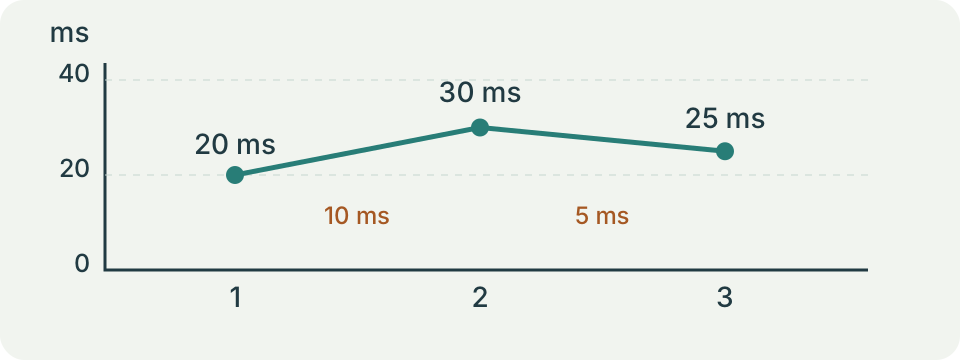
The reported variation is the mean absolute difference between adjacent successful samples in their original order. For durations 20, 30 and 50 ms, the two changes are 10 and 20 ms. Their average is 15 ms. The mean duration is about 33.333 ms and the median is 30 ms. Average delay and variation answer different questions; one should not replace the other.
Consider 20 ms, 30 ms, a failed request, 50 ms and 70 ms. Only the 20-to-30 and 50-to-70 pairs qualify. Their average change is still 15 ms. The tool does not join 30 to 50 across the missing observation. Four completed requests have a mean of 42.5 ms and median of 40 ms; the missing row remains visible rather than becoming a guessed duration.
The second table row refers to the sequence with a failed third attempt described above. Its successful durations are listed separately; adjacency is still decided by the original sample positions.
| Successful durations (ms) | Mean (ms) | Median (ms) | Adjacent change (ms) |
|---|---|---|---|
| 20 / 30 / 50 | 33.333 | 30 | 15 |
| 20 / 30 / 50 / 70 | 42.5 | 40 | 15 |
Know When a Result Is Unavailable
One successful sample can supply minimum, maximum, mean and median, but it has no adjacent pair. Two successes separated by a failure also have no qualifying pair. An unavailable variation value in either case is not measured zero variation. Equal adjacent durations can legitimately give zero, which means no observed change within those pairs, not proof of perfectly constant packet delivery.
All failed attempts leave no timing summary. A timeout or unsupported endpoint does not establish that every Internet destination is unreachable. Server load, an HTTP response problem, connection restrictions and browser scheduling can affect the outcome. Copy requests clipboard access and reports a failure when unavailable. Printing uses the normal browser dialog; neither action creates an independent network measurement.
Use a Controlled Comparison to Investigate Spikes
Repeat a run under the same conditions before changing one factor. Compare the same device on a permitted wired connection, then in its usual wireless position. Note competing downloads or uploads through their normal application controls. A repeated improvement after one change is useful evidence for a next check, but the test does not identify interference, channel occupancy or a damaged cable by itself.
For a game or call, collect its own delay and interruption information too. Different protocols and destinations can behave differently. This page has no loaded-versus-idle phase and no media-packet timestamps. Its adjacent HTTP difference is not the smoothed RTP interarrival estimator defined in RFC 3550. Failed HTTP requests are not a measured UDP packet-loss percentage, and no colour or threshold certifies a particular application's quality.
Keep Evidence That Another Person Can Use
Copy the samples with the endpoint, approximate time, connection type and the exact symptom being investigated. Keep a stopped or failed run labelled incomplete. Describe a pattern across repeated runs rather than selecting only the best number. Avoid sharing credentials, full account identifiers or unrelated personal screenshots in a support request; the timing record usually needs much less information.
Use the speed test for the separate question of payload throughput. Use the game-lag check when the symptom could be low frame rate, local input delay or network delay. Neither tool turns this timing sample into a diagnosis. A calm HTTP route is a useful observation, while continued problems in the affected application still need checks that match its own path and behaviour.
What the Result Means
Browser scheduling, connection reuse, server processing and the route affect these timings. At least two valid adjacent readings are needed for variation. HTTP errors do not measure IP packet loss. Results cannot establish one-way jitter, RTP jitter or latency to a game or call server. Requests reach this site and expose ordinary connection metadata.
Common Questions
Is This the Same as a Ping Command?
No. A ping command commonly uses ICMP. This test times HTTP requests and includes browser and server work.
Does Zero Variation Mean Zero Delay?
No. Equal round-trip readings have zero change even when every request takes a substantial time.